Add Name and Date on Photo - SSC Photo with Name and Date
Print your name and the date the photo was taken under the picture, as SSC and some state forms require.
Choose your form's requirement
Output: 276 x 354 pixels (3.5 x 4.5 cm at 200 DPI). Requirements change between notifications - match the numbers in yours.
Drop your photo here
JPG, PNG, WebP or HEIC. It stays on your device - nothing is uploaded.
How to use Photo with Name and Date
- 1Type your name and the photo dateUse your name as on the application. The date is the day the photo was taken, in DD.MM.YYYY.
- 2Add your photoA recent photo with a plain background. The name strip is added below the face, inside the size.
- 3Crop to the faceThe box fits the space above the strip, so the face is not squeezed.
- 4Create and downloadThe JPG is 3.5 x 4.5 cm and 20-50 KB unless you change the numbers.
Your files are processed over an encrypted connection and deleted automatically within one hour. Nothing is shared with anyone.
Photo with Name and Date: what to know before you start
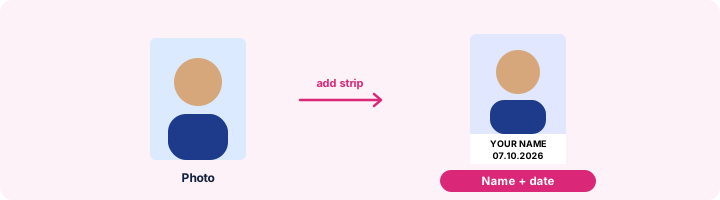
Getting the strip right
The name and date take the bottom fifth of the photo, printed in bold black capitals so they stay readable at small sizes. Long names shrink to fit the width. Keep the name exactly as on your application - spelling differences are a common reason for rejection.
Frequently asked questions
How do I add my name and date on a photo for SSC?
Type your name and the photo date, add the photo, crop the face and press Create photo. Name and date are printed in black on a white strip at the bottom.
Which date should I write?
The date the photo was taken. Some notifications require the photo to be taken within a set period before applying, so use a recent one.
Does SSC still ask for name and date on the photo?
It has changed between notifications, and some exams now capture a live photo instead. Read the "photograph" section of your notification; if it asks for name and date, use this page, otherwise use Compress Image to 50KB.
Is this tool free?
Yes. Every tool on WorkSathi is free to use with no sign up, no watermark on your result and no daily limit.
What happens to my files?
Files are uploaded over an encrypted connection, processed, and then deleted automatically within one hour. We never open, share or sell your documents.
Does it work on a phone?
Yes. The tools work in any modern browser on Windows, Mac, Android and iOS - there is nothing to install.
Related PDF tools
SSC Photo and Signature Resizer
Make your photo and signature fit the SSC form: photo 3.5 x 4.5 cm at 20-50 KB, signature 10-20 KB, with name and date if asked.
Crop and resize your signature to the pixels and KB your form asks for: 140 x 60 px, 6 x 2 cm, 10-20 KB.
Get a passport-style photo between 20 and 50 KB - the range most exam and job forms ask for.
Set the size in centimetres - passport 3.5 x 4.5 cm, signature 6 x 2 cm - with the DPI your form or printer needs.