PII Detection Tool - Find Personal Data in PDF Documents
Scan a PDF for Aadhaar, PAN, card numbers, SSN, IBAN, passport and bank account numbers, phone numbers and emails.
Drop your PDF here
or
PDF files up to 100 MB
How to use PII Detection Tool
- 1Upload the PDFStatements, KYC packs, HR files, exports - anything that might hold personal data.
- 2Scan every pageThe text layer of each page is checked against 15 kinds of personal identifier.
- 3Review the matchesEach type shows how many were found, on which pages, with masked samples.
- 4Redact before sharingOpen Redact PDF to remove the data permanently, then scan again to confirm.
Your files are processed over an encrypted connection and deleted automatically within one hour. Nothing is shared with anyone.
PII Detection Tool: what to know before you start
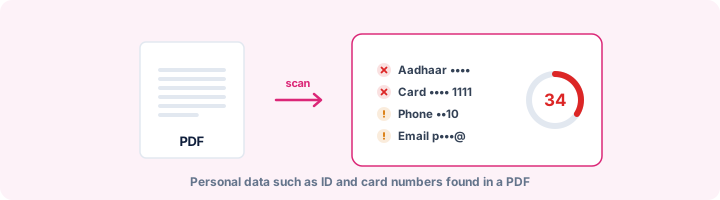
What the scanner looks for
Personally identifiable information is anything that points to a specific person, on its own or with a little extra context. The scanner groups what it finds by how much harm a leak could do:
- High risk: Aadhaar, PAN, payment card numbers, US Social Security numbers, IBANs, bank account numbers and passport numbers.
- Medium risk: GSTIN, Voter ID (EPIC), Indian driving licence numbers, UK National Insurance numbers, dates of birth and phone numbers.
- Low risk: email addresses and IP addresses.
How it avoids false alarms
Plenty of numbers have the shape of an ID without being one. An invoice number or an order ID can be twelve digits long, the same as an Aadhaar number. So wherever an ID format has a built-in check digit, the scanner tests it: the Luhn check for cards, Verhoeff for Aadhaar, and mod-97 for IBANs. A number that fails its check is ignored.
Some formats have no check digit and a very common shape, such as passport numbers, bank account numbers, dates of birth and Voter IDs. Those only count when a label sits right in front of them, like "Passport No:" or "DOB". The scanner will miss the odd unlabelled one, but it will not bury you in false matches.
One more safeguard: once part of the text is matched as something specific, nothing weaker can claim it. In testing, a 16-digit card number was first being reported a second time as a phone number. Now each number is reported once, under the most specific type.
Once you have found it
First ask whether the data needs to be in the document at all. If not, remove it from the original. If the file has to go out without it, use Redact PDF, which deletes the text under each box rather than just covering it, and then scan the result again.
Scanned documents need OCR before they can be checked. A scan with no text layer gets a "no text to scan" result, not a false all-clear.
Frequently asked questions
What types of PII does it detect?
Aadhaar, PAN, GSTIN, Voter ID, Indian driving licence, payment card numbers, US Social Security numbers, UK National Insurance numbers, IBAN, bank account and passport numbers (when labelled), dates of birth (when labelled), phone numbers, email addresses and IP addresses.
How does it avoid false positives?
Card numbers must pass the Luhn checksum, Aadhaar numbers the Verhoeff checksum and IBANs the mod-97 check. Ambiguous patterns - a passport number, a bank account, a date of birth - only count when a label such as "Passport No" sits right before them.
Does it find PII in scanned documents?
Only if the scan has a text layer. A photo of a document has no text to search, so the report says so; run OCR first, then scan the result.
Is this a GDPR or DPDP compliance tool?
It helps you find personal data before you share a file, which is the first step of data minimisation under GDPR and India's DPDP Act. It does not decide whether processing is lawful.
Is this tool free?
Yes. Every tool on WorkSathi is free to use with no sign up, no watermark on your result and no daily limit.
What happens to my files?
Files are uploaded over an encrypted connection, processed, and then deleted automatically within one hour. We never open, share or sell your documents.
Does it work on a phone?
Yes. The tools work in any modern browser on Windows, Mac, Android and iOS - there is nothing to install.
Related PDF tools
Permanently blackout SSN, credit cards, bank accounts, and personal data from PDF.
Find what a PDF leaks: author names, old versions, comments, hidden layers, attachments, scripts and personal data.
Find failed redactions: text still under black boxes, unapplied redaction marks, hidden text and recoverable earlier versions.
Strip author name, creation dates, and hidden details from your PDF before sharing.