ADA PDF Checker - Test PDF Compliance for ADA Title II & III
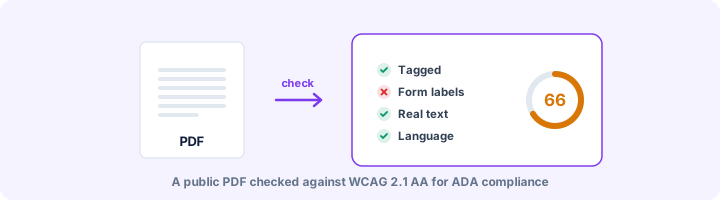
Check PDFs on your website against WCAG 2.1 AA, the standard the 2024 ADA Title II rule adopted.
Drop your PDF here
or
PDF files up to 100 MB
How to use ADA PDF Checker
- 1Upload a public PDFAgendas, forms, notices, reports - anything people download from your website.
- 2Run the ADA checkThe file is tested against the WCAG 2.1 AA criteria that apply to PDF documents.
- 3Prioritise the critical issuesUntagged files, scanned pages, missing alt text and unlabelled form fields block screen reader users completely.
- 4Fix, re-check, publishFix at the source, re-export and upload again until the critical issues are gone.
Your files are processed over an encrypted connection and deleted automatically within one hour. Nothing is shared with anyone.
ADA PDF Checker: what to know before you start
Where PDFs fit into the ADA
In April 2024 the US Department of Justice published a rule under Title II of the ADA requiring state and local governments to make their web content meet WCAG 2.1 Level AA. The rule says in so many words that this includes documents, PDFs among them, posted on their websites. Title III, which covers businesses, has no equivalent technical rule, but lawsuits and settlements regularly use WCAG 2.1 AA as the benchmark.
PDFs tend to be the weakest content on a site. A council website can easily hold years of scanned notices, untagged meeting agendas and fill-in forms that cannot be completed without a mouse.
Where to start with a large backlog
If you have hundreds of files, do not work through them in upload order. Sort them first:
- Delete what is out of date or duplicated elsewhere. Removing a file is the cheapest fix there is.
- Fix first the documents people need in order to use a service: application forms, fee schedules, eligibility rules, public notices.
- Replace scanned PDFs with real text, or put the content on an ordinary web page instead.
- Give staff an accessible template for new documents so the backlog stops growing while you work through it.
What this check can and cannot tell you
It reliably finds the barriers software can detect: untagged files, missing alt text, missing titles and languages, unlabelled form fields and scanned pages. Each finding is labelled with its WCAG 2.1 criterion.
It cannot tell you whether you are legally compliant. That depends on things outside the file, such as which exceptions in the rule apply to you, and on the manual checks listed at the end of the report. A clean result is good evidence of care. It is not a certificate, and it is not legal advice.
Frequently asked questions
Does the ADA apply to PDF documents?
Yes. In April 2024 the US Department of Justice published a Title II rule requiring state and local governments to make web content - including PDFs they post - meet WCAG 2.1 Level AA, with compliance dates set in 2026 and 2027 depending on population size. Courts have also applied Title III to private businesses' websites and documents.
Which ADA standard is a PDF tested against?
WCAG 2.1 Level AA. Every result in the report is labelled with the WCAG 2.1 success criterion it relates to.
Are old PDFs exempt?
The Title II rule has limited exceptions, including archived content and some pre-existing documents that are not used to apply for or access services. The exceptions are narrow and fact-specific - check the DOJ guidance or ask counsel before relying on one.
Is this tool free?
Yes. Every tool on WorkSathi is free to use with no sign up, no watermark on your result and no daily limit.
What happens to my files?
Files are uploaded over an encrypted connection, processed, and then deleted automatically within one hour. We never open, share or sell your documents.
Does it work on a phone?
Yes. The tools work in any modern browser on Windows, Mac, Android and iOS - there is nothing to install.
Related PDF tools
Check a PDF against the Revised Section 508 Standards (E205.4), which require WCAG 2.0 Level AA for electronic documents.
See which WCAG success criteria your PDF passes or fails - alt text, titles, language, headings, tables, links and forms.
A full accessibility report for any PDF: tagging, alt text, reading structure, fonts, forms and links, with fixes.
Check a PDF against PDF/UA-1 rules: tags, alt text, language, fonts, Unicode and tab order, mapped to Matterhorn checkpoints.