PNG to WebP Converter (Bulk & ZIP)
Convert one PNG or a whole folder to WebP. Transparent backgrounds stay transparent, and multiple files come back as one ZIP.
Drop PNG images or entire folder here
or
PNG images, up to 100 files at once
How to use PNG to WebP
- 1Upload PNG images or folderPick the files, or use "Add Folder" to take every PNG in a folder. Anything that is not a PNG, such as .DS_Store or a text file, is skipped automatically.
- 2Choose compression settingsHigh (85%) suits photos and screenshots. For logos, icons and diagrams with sharp edges, choose Lossless so no pixel changes.
- 3Batch convert to WebPClick "Convert to WebP". Each image is converted in turn; a batch of a few dozen ordinary PNGs usually takes seconds.
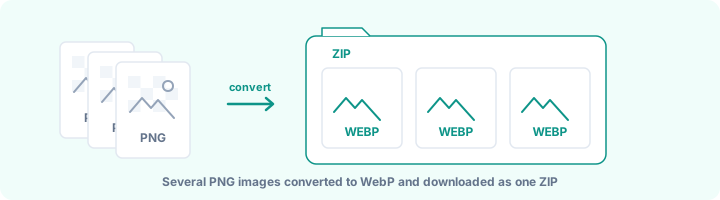
- 4Download as ZIP or save to folderOne image downloads as a .webp file, several come as a ZIP. In Chrome and Edge you can also use "Save to Folder" to write them straight into a folder.
Your files are processed over an encrypted connection and deleted automatically within one hour. Nothing is shared with anyone.
PNG to WebP: what to know before you start
When converting PNG to WebP is worth it
PNG is a lossless format: it keeps every pixel exactly, which is why screenshots, logos and graphics with text look crisp in it. The cost is size. A full-screen screenshot or a product photo saved as PNG easily runs to 1-3 MB, and a page with a dozen of them is slow on a phone connection.
WebP can store the same image either losslessly, typically about a quarter smaller than PNG, or lossily at a quality you choose, which is usually much smaller again. For images on a website, that is the main reason to switch. For images you will print, edit further or send to someone with older software, PNG is still the safer choice.
Lossy or lossless?
Pick by what is in the image, not by habit:
- Lossless for logos, icons, UI screenshots, diagrams and anything with sharp text. Nothing changes, and it is still smaller than the PNG.
- High (85%) for photos, product shots and illustrations. Differences are very hard to spot at normal viewing size.
- Balanced (75%) when page weight matters more, such as long blog pages or galleries.
- Maximum compression (65%) only for thumbnails and previews. Fine text and gradients start to show artefacts.
Converting a whole folder
Use "Add Folder" or drag the folder onto the page. Every PNG inside is queued, and files that are not PNGs are skipped and listed, so a stray .DS_Store or a notes file does not stop the batch. Up to 100 files go in one run.
One image downloads as a .webp file. Several arrive as a single ZIP with the original file names kept, so photo-01.png becomes photo-01.webp. In Chrome and Edge, "Save to Folder" writes the files straight into a folder you choose instead.
Using the WebP files on your site
Every current browser displays WebP, so on most sites you can simply replace the PNG with the WebP file. WordPress has accepted WebP uploads since version 5.8, and Shopify and Next.js handle it out of the box.
Keep your PNG originals. If you need to edit an image later, start from the PNG and convert again rather than editing the WebP, especially if you used lossy mode.
Frequently asked questions
Can I convert many PNG files to WebP at once?
Yes, up to 100 files in one go (100 MB per file, 300 MB in total). Add them with Select PNG Images, Add Folder or by dragging a folder onto the page. One file downloads as a .webp; more than one comes back as a single ZIP.
Do transparent backgrounds survive the conversion?
Yes. WebP supports an alpha channel just like PNG, and both lossy and lossless modes keep it. In lossy mode the transparency itself is stored at high quality, so soft shadows and anti-aliased edges stay smooth.
How much smaller will my files be?
It depends on the image. Google's own measurements put lossless WebP at about 26% smaller than PNG on average. Lossy mode usually saves far more, especially on photos and screenshots, while flat graphics with few colours can shrink by 80-90%. The result panel shows the exact saving for your files.
Does WebP help my website speed and SEO?
Smaller images load faster, which helps Largest Contentful Paint, one of the Core Web Vitals Google uses as a ranking signal. It is one factor among many, so do not expect a ranking jump from image format alone, but on image-heavy pages the speed difference is real.
Which browsers can open WebP?
All current versions of Chrome, Edge, Firefox and Safari (Safari from version 14, macOS Big Sur and iOS 14), plus Android. Some older desktop programs, print shops and upload portals still do not accept WebP, so keep the PNG originals.
Why is "Save to Folder" missing in my browser?
It uses the File System Access API, which only Chrome, Edge and other Chromium browsers support. In Safari and Firefox, download the ZIP instead.
Is this tool free?
Yes. Every tool on WorkSathi is free to use with no sign up, no watermark on your result and no daily limit.
What happens to my files?
Files are uploaded over an encrypted connection, processed, and then deleted automatically within one hour. We never open, share or sell your documents.
Does it work on a phone?
Yes. The tools work in any modern browser on Windows, Mac, Android and iOS - there is nothing to install.
Related PDF tools
Convert PNG images to PDF, with background transparency controls.
Convert website WebP images into a printable PDF file.
Combine passport photos, Aadhaar images, and receipts into one PDF.
Combine JPG, PNG, WebP, HEIC, GIF, and TIFF images in one PDF.
Export PDF pages as lightweight, fast-loading WebP images.