PDF Metadata Checker - View All Hidden PDF Properties
See every property stored in a PDF - title, author, software, dates, XMP, custom fields, fonts and edit history.
Drop your PDF here
or
PDF files up to 100 MB
How to use PDF Metadata Checker
- 1Upload the PDFThe metadata is read without changing the file.
- 2See every propertyDocument info, XMP, custom fields, fonts, attachments and links in one view.
- 3Check the warningsAuthor names, file paths, edit history and mismatched values are flagged.
- 4Clean it upUse PDF Metadata Remover to strip anything you do not want to publish.
Your files are processed over an encrypted connection and deleted automatically within one hour. Nothing is shared with anyone.
PDF Metadata Checker: what to know before you start
Metadata lives in two places
A PDF can keep its properties twice. The older Document Information dictionary holds Title, Author, Subject, Keywords, Creator (the program that made the original), Producer (the program that wrote the PDF) and two dates. The newer XMP block is a piece of XML that can hold all of that and more: document IDs, an edit history, rights notes, and the PDF/A and PDF/UA declarations.
This checker reads both and shows them side by side. When the two disagree, it says so, because different PDF readers show different copies. You can fix a title in one place and still see the old one somewhere else.
What to look for before you publish
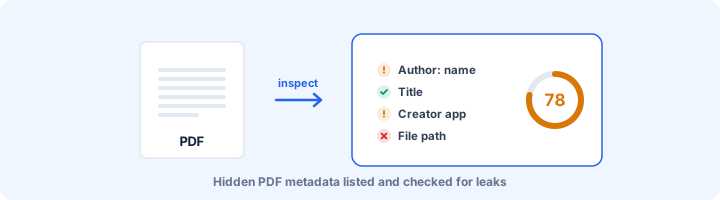
These are the fields that most often give away more than intended. The report flags each one, and PDF Metadata Remover clears them without touching the pages:
- Author. Often your Windows or Office login rather than anything you typed. In one file we tested, it was a full personal email address.
- File paths. Some programs record the folder the file was saved from, and the path includes your username.
- Custom properties. Document management, CRM and template tools leave their own fields behind, such as client codes and internal reference numbers.
- XMP history. A log of which programs saved the file, and when.
- Title. Frequently left over from a template, like "Proposal FINAL v7 do not send".
Some metadata is worth keeping
Not all of it is a risk. The title is what a screen reader announces, what a browser tab shows, and often what Google uses as the heading for a PDF in search results. The subject becomes the description in many document libraries. Fill those two in on purpose and remove the rest.
Frequently asked questions
Where is metadata stored in a PDF?
In two places: the older Document Information dictionary (Title, Author, Subject, Keywords, Creator, Producer, dates) and the XMP metadata stream, an XML packet that newer software and the PDF/A and PDF/UA standards rely on. The checker reads both and tells you when they disagree.
What can metadata reveal?
Your name or login, your company, the exact software and version used, when the file was created and last edited, and sometimes the full folder path it was saved from - which includes your username.
Why do Info and XMP sometimes show different values?
Some tools update only one of the two. Readers then show whichever they prefer, so a title you corrected may still appear in the old form elsewhere. PDF/A requires both to match.
Is this tool free?
Yes. Every tool on WorkSathi is free to use with no sign up, no watermark on your result and no daily limit.
What happens to my files?
Files are uploaded over an encrypted connection, processed, and then deleted automatically within one hour. We never open, share or sell your documents.
Does it work on a phone?
Yes. The tools work in any modern browser on Windows, Mac, Android and iOS - there is nothing to install.
Related PDF tools
Strip author name, creation dates, and hidden details from your PDF before sharing.
Find what a PDF leaks: author names, old versions, comments, hidden layers, attachments, scripts and personal data.
Pre-flight a PDF for long-term archiving: XMP identification, embedded fonts, output intent, encryption, JavaScript and attachments.
Scan a PDF for Aadhaar, PAN, card numbers, SSN, IBAN, passport and bank account numbers, phone numbers and emails.