WCAG PDF Checker - Test a PDF Against WCAG 2.1 / 2.2
See which WCAG success criteria your PDF passes or fails - alt text, titles, language, headings, tables, links and forms.
Drop your PDF here
or
PDF files up to 100 MB
How to use WCAG PDF Checker
- 1Upload your PDFReports, brochures, forms, policies - anything you publish on a website.
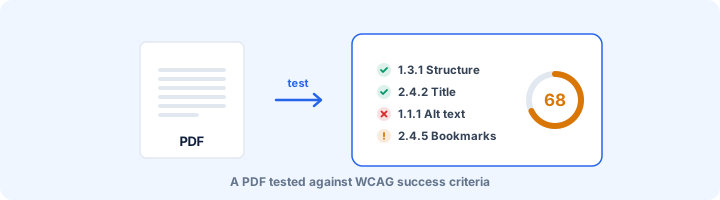
- 2Run the WCAG checkThe file is tested against the WCAG success criteria that apply to PDF and can be measured automatically.
- 3Review by criterionEvery row names its success criterion, so you can map the result straight into an audit or VPAT.
- 4Work through the human checksContrast, reading order and colour use are listed separately because software cannot judge them reliably.
Your files are processed over an encrypted connection and deleted automatically within one hour. Nothing is shared with anyone.
WCAG PDF Checker: what to know before you start
Which WCAG criteria matter for a PDF
WCAG was written with web pages in mind, but it does not name a technology, and the W3C publishes a set of PDF techniques for meeting it. For a typical document, eight success criteria carry most of the weight:
- 1.1.1 Non-text Content: images, charts and formulas need alternate text, and a scanned page needs a real text layer.
- 1.3.1 Info and Relationships: headings, lists and tables must be tagged as such. Bold 16pt text is not a heading to a screen reader.
- 1.3.2 Meaningful Sequence: the tag order has to match the order a person would read in.
- 2.4.2 Page Titled: the file needs a real title, shown in place of the file name.
- 2.4.4 Link Purpose: each link should make sense from its text or its description.
- 3.1.1 Language of Page: the language must be set so words are pronounced correctly.
- 3.3.2 Labels and 4.1.2 Name, Role, Value: every form field needs a name a screen reader can announce.
- 1.4.3 Contrast: body text needs a contrast ratio of at least 4.5:1 with its background.
How to read a pass and a fail
Treat the two differently. A fail is solid. If the file has no language set, 3.1.1 fails and there is nothing to debate.
A pass means the part of the criterion a machine can measure is met. Take 1.3.1: we can confirm a table has header cells, but not that the right cells were chosen as headers. So use passes as a sign you are on track, and keep the manual checks at the end of the report for the rest.
Every row names its success criterion, so findings can go straight into an audit sheet or the documents section of a VPAT.
Fix it in the source, not the PDF
Almost every WCAG problem in a PDF is cheaper to fix in the Word, PowerPoint or Google Docs file it came from. Use the built-in heading styles, add alt text to each image, mark the header row of each table, set a title under File > Properties, and export with "Document structure tags for accessibility" ticked.
You can repair a PDF directly in Acrobat Pro, but those repairs are lost the next time someone edits the original and exports again. That is how the same report ends up being fixed every quarter.
Frequently asked questions
Does WCAG apply to PDF files?
Yes. WCAG is technology-neutral: a PDF linked from a web page is web content, and the W3C publishes PDF-specific techniques (PDF1-PDF23) showing how each success criterion is met in a PDF.
Which WCAG version does this check?
The automated rules cover criteria that exist in WCAG 2.0, 2.1 and 2.2 alike - the PDF-relevant criteria barely changed between versions. WCAG 2.1 added Reflow (1.4.10), which is listed as a human check.
Can a PDF pass WCAG with an automated test alone?
No. Automated testing catches missing structure reliably, but roughly half of WCAG needs judgement: is the alt text meaningful, is the reading order logical, is the contrast high enough on that background. The report keeps those separate so nobody mistakes a clean scan for a pass.
Is this tool free?
Yes. Every tool on WorkSathi is free to use with no sign up, no watermark on your result and no daily limit.
What happens to my files?
Files are uploaded over an encrypted connection, processed, and then deleted automatically within one hour. We never open, share or sell your documents.
Does it work on a phone?
Yes. The tools work in any modern browser on Windows, Mac, Android and iOS - there is nothing to install.
Related PDF tools
Check PDFs on your website against WCAG 2.1 AA, the standard the 2024 ADA Title II rule adopted.
Check a PDF against PDF/UA-1 rules: tags, alt text, language, fonts, Unicode and tab order, mapped to Matterhorn checkpoints.
A full accessibility report for any PDF: tagging, alt text, reading structure, fonts, forms and links, with fixes.
Check a PDF against the Revised Section 508 Standards (E205.4), which require WCAG 2.0 Level AA for electronic documents.