PDF Redaction Checker - Is Your Redacted Text Really Gone?
Find failed redactions: text still under black boxes, unapplied redaction marks, hidden text and recoverable earlier versions.
Drop your PDF here
or
PDF files up to 100 MB
How to use PDF Redaction Checker
- 1Upload the redacted PDFThe final file you are about to send, file or publish.
- 2Run the checkEach page is rendered and every word in the file is compared with what is actually visible.
- 3See what leaksText found under boxes is listed (hidden until you reveal it), with page numbers.
- 4Redact properly and re-checkUse Redact PDF, which deletes the text under each box, then upload the new file.
Your files are processed over an encrypted connection and deleted automatically within one hour. Nothing is shared with anyone.
PDF Redaction Checker: what to know before you start
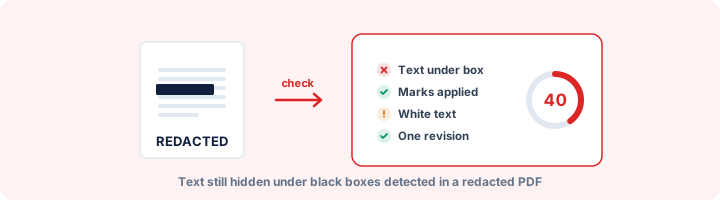
The redaction mistake that keeps repeating
Court filings, government reports and company disclosures keep getting published with "redacted" passages that anyone can copy out. The cause is nearly always the same. Someone drew a black rectangle over the text, or highlighted it in black, instead of using a redaction tool. The box hides the words on screen, but the words are still in the file.
To test this checker we made a file with exactly that mistake: a line reading "CONFIDENTIAL SETTLEMENT AMOUNT 9,50,000" with a black box drawn on top. On screen it looked properly redacted. The checker recovered the full line.
How it finds hidden text
It renders each page to an image, exactly as a reader would see it. Then it asks the PDF where every run of text is positioned and looks at the pixels in that spot. If there are letters, the text is visible. If the spot is one flat colour, the text is covered, or drawn in a colour that cannot be seen, but it is still in the file.
The same pass catches white text on a white page and text hidden behind a white shape, which are reported separately from black boxes.
Other ways a redaction can come undone
Covered text is the best-known failure but not the only one. The report also checks for:
- Redaction marks that were placed but never applied, because the "Apply" step was skipped.
- Text too small to see, which can still be searched and copied.
- An earlier version of the file, saved before the redaction, still sitting inside it.
- A title, comment or attachment that repeats what was removed.
- ID, card or account numbers that were missed and are still in the text.
Redacting so that it holds
Use a tool that removes the content rather than covering it. Redact PDF on this site rebuilds each page you mark, so the words under the boxes no longer exist in the file. Then run the result through this checker before it goes anywhere.
Anything the checker recovers is hidden behind a Reveal button and left out of the downloaded report, so the report itself cannot leak it.
Frequently asked questions
Can a redacted PDF be unredacted?
Not if it was redacted properly - the text under the boxes is deleted from the file. But many redactions are not proper: a black box drawn over text, an unapplied redaction mark or an older saved version all leave the original readable. That is exactly what this checker looks for, so check your own files before someone else does.
Why do redactions fail?
Drawing a black rectangle, highlighting in black or covering text with a shape hides it on screen but leaves the words in the file. Anyone can select, copy or search them. Proper redaction removes the content underneath, which needs a redaction tool rather than a drawing tool.
How does the checker find text under black boxes?
It renders each page and looks at the pixels where every piece of text is supposed to be. If the area is a flat colour instead of letters, the text is covered or invisible - but still in the file.
What else can undo a redaction?
Earlier versions kept inside the file by incremental saving, unapplied redaction marks, comments quoting the original, attachments, metadata such as the title, and OCR text layers on scanned pages. The report checks all of them.
Are the recovered words stored?
No. They are sent only to your browser, hidden behind a Reveal button, and nothing is kept on our server.
Is this tool free?
Yes. Every tool on WorkSathi is free to use with no sign up, no watermark on your result and no daily limit.
What happens to my files?
Files are uploaded over an encrypted connection, processed, and then deleted automatically within one hour. We never open, share or sell your documents.
Does it work on a phone?
Yes. The tools work in any modern browser on Windows, Mac, Android and iOS - there is nothing to install.
Related PDF tools
Permanently blackout SSN, credit cards, bank accounts, and personal data from PDF.
Scan a PDF for Aadhaar, PAN, card numbers, SSN, IBAN, passport and bank account numbers, phone numbers and emails.
Find what a PDF leaks: author names, old versions, comments, hidden layers, attachments, scripts and personal data.
Flatten interactive form fields, annotations, and signatures into uneditable PDF pages.