PDF/A Validator - Check PDF/A-1, PDF/A-2 & PDF/A-3 Compliance
Pre-flight a PDF for long-term archiving: XMP identification, embedded fonts, output intent, encryption, JavaScript and attachments.
Drop your PDF here
or
PDF files up to 100 MB
How to use PDF/A Validator
- 1Upload the PDFThe file you plan to archive or file with a court, tender or government portal.
- 2Pick the PDF/A partLeave it on Auto to validate against the part the file claims, or choose the one the portal demands.
- 3ValidateIdentification, fonts, colour, encryption, actions, attachments and annotations are checked against ISO 19005.
- 4Fix what failedEach failure cites its ISO 19005 clause and the usual fix, most often re-exporting with the PDF/A option on.
Your files are processed over an encrypted connection and deleted automatically within one hour. Nothing is shared with anyone.
PDF/A Validator: what to know before you start
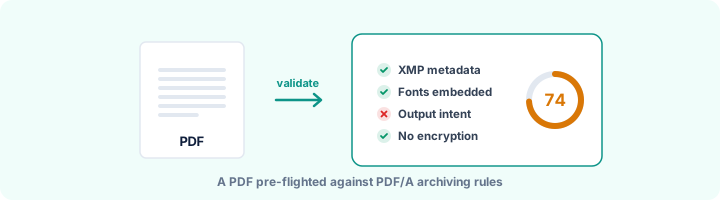
What PDF/A rules out, and why
The point of PDF/A is that a file opened in thirty or fifty years looks exactly the way it does today. So anything that depends on the outside world, or could behave differently later, is banned. That means fonts that are not embedded, since another computer would swap in its own. It means encryption, since the password may be long gone. It means JavaScript and launch actions, and links to content outside the file.
The same logic applies to colour. If the file uses plain RGB or CMYK, it has to carry an ICC colour profile (an "output intent") that says exactly what those numbers mean.
Which PDF/A part to choose
Use whatever part the court, archive or portal asks for. If it does not say:
- PDF/A-1b (2005, based on PDF 1.4) is the oldest and the most widely accepted. It does not allow transparency or layers, so modern designs often need flattening first.
- PDF/A-2b (2011, based on PDF 1.7) is the sensible default today. It allows transparency, layers and JPEG 2000. Attachments are allowed only if they are PDF/A files too.
- PDF/A-3b (2012) is the same as 2b but allows attachments of any kind. E-invoice formats such as ZUGFeRD and Factur-X use it to carry their XML data.
- The letter matters too. "b" means the appearance is preserved, "u" adds a rule that all text maps to Unicode, and "a" also requires the file to be tagged and accessible.
The four problems behind most rejections
Four things account for most rejected uploads. The file never declares itself PDF/A, because there is no pdfaid entry in its XMP. A font is not embedded, often Arial or Helvetica, which people assume every computer has. There is no output intent. Or the file has a password. Re-exporting from the original application with its PDF/A option switched on fixes all four, and is quicker than repairing the PDF.
One limit worth knowing: this validator checks the document structure, but it does not open every font program or colour space the way veraPDF, the reference validator, does. If a file passes here and you need a formal conformance report, confirm it with veraPDF.
Frequently asked questions
What is PDF/A?
PDF/A is ISO 19005, the archival form of PDF. It requires everything needed to display the document to be inside the file - fonts, colour profiles, metadata - and forbids anything that could change or break over time, such as encryption, JavaScript and external content.
What is the difference between PDF/A-1b, 2b and 3b?
PDF/A-1 (2005) is based on PDF 1.4 and forbids transparency and layers. PDF/A-2 (2011) is based on PDF 1.7 and allows them, plus JPEG 2000. PDF/A-3 (2012) is PDF/A-2 that may carry attachments of any type, such as the XML in an e-invoice. The "b" level means visual appearance is preserved; "a" also requires tagging; "u" requires Unicode text.
Is this as thorough as veraPDF?
No - veraPDF checks hundreds of low-level rules, including inside every font and colour space. This validator covers the rules behind the large majority of real rejections and explains them in plain language. If it passes here and you need a formal report, run veraPDF to confirm.
Can I convert my PDF to PDF/A here?
Not yet. The quickest route is to re-export from the source: in Word choose Save As > PDF > Options > "PDF/A compliant"; in LibreOffice choose Export as PDF > "Archive (PDF/A)".
Is this tool free?
Yes. Every tool on WorkSathi is free to use with no sign up, no watermark on your result and no daily limit.
What happens to my files?
Files are uploaded over an encrypted connection, processed, and then deleted automatically within one hour. We never open, share or sell your documents.
Does it work on a phone?
Yes. The tools work in any modern browser on Windows, Mac, Android and iOS - there is nothing to install.
Related PDF tools
See every property stored in a PDF - title, author, software, dates, XMP, custom fields, fonts and edit history.
Check a PDF against PDF/UA-1 rules: tags, alt text, language, fonts, Unicode and tab order, mapped to Matterhorn checkpoints.
One score out of 100 across accessibility, privacy, PDF/A archiving and security - with a breakdown of what costs points.
Remove owner passwords and printing restrictions from your PDF files.