PDF Privacy Checker - Find Hidden Data Before You Share a PDF
Find what a PDF leaks: author names, old versions, comments, hidden layers, attachments, scripts and personal data.
Drop your PDF here
or
PDF files up to 100 MB
How to use PDF Privacy Checker
- 1Upload the PDF you plan to shareContracts, CVs, reports, statements - anything leaving your hands.
- 2Run the privacy scanMetadata, revisions, comments, layers, attachments, scripts and every page of text are inspected.
- 3Review what leaksEach finding says what an outsider could see and how serious it is.
- 4Clean and re-checkUse the linked tools to strip metadata, flatten comments or redact text, then scan again.
Your files are processed over an encrypted connection and deleted automatically within one hour. Nothing is shared with anyone.
PDF Privacy Checker: what to know before you start
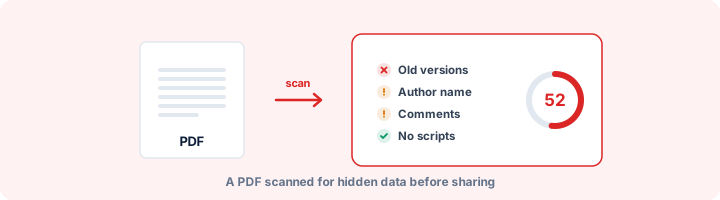
What else travels with a PDF
A PDF can carry a lot more than what is on its pages. Before you email a contract, publish a report or upload a CV, these are the things to know about:
- Earlier versions of the document, kept by programs that save changes by adding to the end of the file.
- Metadata: the author, the software used, dates, folder paths and custom fields.
- Comments and the names of the people who wrote them, including comments marked as resolved.
- Hidden layers that are switched off by default but can be switched back on by anyone.
- Attached files, such as the spreadsheet a report was built from.
- Text that is covered or written in white. It does not show, but it can be selected and copied.
- Filled-in form data, which can be exported in a click.
- Scripts that run when the file opens, or buttons that send data somewhere.
Why earlier versions matter so much
Many programs do not rewrite a PDF when you save an edit. They append the change to the end, and the original stays in the file underneath. If an earlier version had a different price, a name you later removed or a clause you deleted, someone with a free tool can get it back.
Not every extra section is an edit. Word, for example, adds a small empty section to every PDF it exports. The checker only counts a section as an earlier version if it actually changes content, so ordinary Word exports are not flagged.
If a real earlier version is found, write a fresh copy. Use "Save As" to a new file in Acrobat, or run the file through Flatten PDF or Compress PDF, which rebuild it from scratch with a single version.
Personal data in the text
The privacy scan also runs the full personal data detector over every page, looking for ID numbers, card and account numbers, phone numbers and email addresses, and reports what it finds. For a breakdown by type with masked examples, use the PII Detection Tool.
Frequently asked questions
What hidden data can a PDF contain?
Metadata (author, software, dates, folder paths), earlier saved versions of the document, reviewer comments and their authors, hidden layers, attached files, filled form data, text hidden under boxes or in white, and scripts that run when the file opens.
What are "earlier versions inside the file"?
Many editors save changes by appending them to the end of the PDF instead of rewriting it. The old content stays in the file and can be extracted. A single "Save As" or running the file through Flatten PDF writes a clean copy.
Does the scan read my document text?
Yes - to find personal data it has to. The text is processed in memory, matches are masked in the report, and nothing is stored after the response is sent.
Is this tool free?
Yes. Every tool on WorkSathi is free to use with no sign up, no watermark on your result and no daily limit.
What happens to my files?
Files are uploaded over an encrypted connection, processed, and then deleted automatically within one hour. We never open, share or sell your documents.
Does it work on a phone?
Yes. The tools work in any modern browser on Windows, Mac, Android and iOS - there is nothing to install.
Related PDF tools
Scan a PDF for Aadhaar, PAN, card numbers, SSN, IBAN, passport and bank account numbers, phone numbers and emails.
Find failed redactions: text still under black boxes, unapplied redaction marks, hidden text and recoverable earlier versions.
Strip author name, creation dates, and hidden details from your PDF before sharing.
Permanently blackout SSN, credit cards, bank accounts, and personal data from PDF.