Section 508 PDF Checker - Test PDF Against Revised 508 Standards
Check a PDF against the Revised Section 508 Standards (E205.4), which require WCAG 2.0 Level AA for electronic documents.
Drop your PDF here
or
PDF files up to 100 MB
How to use Section 508 PDF Checker
- 1Upload the documentDeliverables, reports and forms for a federal agency or contract.
- 2Run the 508 checkThe PDF is tested against the WCAG 2.0 AA criteria that the Revised 508 Standards incorporate.
- 3Use the referencesEach result cites E205.4 and the WCAG criterion, ready for a 508 conformance report or ACR.
- 4Complete the manual itemsReading order, alt text quality and contrast still need a human tester before you sign off.
Your files are processed over an encrypted connection and deleted automatically within one hour. Nothing is shared with anyone.
Section 508 PDF Checker: what to know before you start
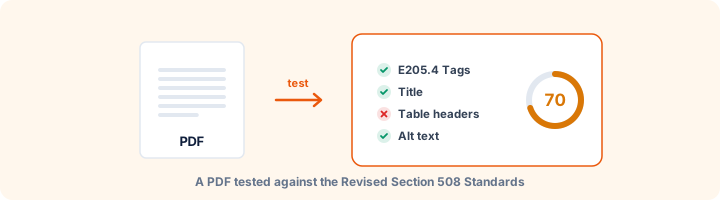
Section 508 for documents, briefly
Since January 2018 the Revised Section 508 Standards have required federal electronic content to meet WCAG 2.0 Level A and AA. Provision E205.4 is the one that brings PDFs and other documents into scope. Federal agencies must comply directly, and most federal contracts pass the same requirement to suppliers, often asking for an Accessibility Conformance Report built on the VPAT template.
Using this report in a 508 review
Each automated result cites E205.4 and the matching WCAG 2.0 criterion, so findings can go straight into the electronic documents section of an ACR. The manual items at the end line up with tests that the federal Trusted Tester process does by hand, such as checking reading order and whether alt text is meaningful.
Note the version. Section 508 points to WCAG 2.0, not 2.1 or 2.2. Some newer criteria, such as Reflow, are not 508 requirements, though meeting them does no harm.
Why documents get sent back
These are the problems that most often get a deliverable returned. Each appears as its own rule in the report, with a fix beside it:
- The PDF is untagged, usually because it came from "Print to PDF" or a scanner.
- Images, charts and scanned signatures have no alternate text.
- Tables have no header cells.
- Fillable form fields have no tooltip, so a screen reader announces each one as just "edit text".
- The document title and language are not set.
- Security settings stop screen readers from reading the text.
Frequently asked questions
What does Section 508 require for PDFs?
The Revised 508 Standards (effective January 2018) require electronic content, including PDFs, to conform to WCAG 2.0 Level A and AA (provision E205.4). Federal agencies must meet them, and most federal contracts pass the requirement on to vendors.
Is Section 508 the same as WCAG?
For documents, effectively yes: 508 incorporates WCAG 2.0 AA by reference. The difference is the version - 508 points to WCAG 2.0, while newer laws such as the ADA Title II rule use WCAG 2.1.
Does passing this make my PDF 508 compliant?
Passing removes the barriers software can detect. Agencies usually also require a manual test (for example with the Trusted Tester process) for reading order, alt text quality and colour contrast.
Is this tool free?
Yes. Every tool on WorkSathi is free to use with no sign up, no watermark on your result and no daily limit.
What happens to my files?
Files are uploaded over an encrypted connection, processed, and then deleted automatically within one hour. We never open, share or sell your documents.
Does it work on a phone?
Yes. The tools work in any modern browser on Windows, Mac, Android and iOS - there is nothing to install.
Related PDF tools
Check PDFs on your website against WCAG 2.1 AA, the standard the 2024 ADA Title II rule adopted.
Check a PDF against PDF/UA-1 rules: tags, alt text, language, fonts, Unicode and tab order, mapped to Matterhorn checkpoints.
A full accessibility report for any PDF: tagging, alt text, reading structure, fonts, forms and links, with fixes.
See which WCAG success criteria your PDF passes or fails - alt text, titles, language, headings, tables, links and forms.